SuiteScript 2.1 Conversion
NetSuite requires SuiteScript 2.1 by release 2028.2.
Find out what that means for your account.
We analyze your NetSuite account and hand you a conversion plan. What you have, what has to change, and what it will take.
The deadline
2028.2 is the deadline everyone quotes. 2027.1 is the one that reaches you first.
Your SuiteScript 1.0 scripts keep running right now. NetSuite has published the schedule for when that stops, and the first real change lands well before the final one.
| Release | What changes |
|---|---|
| 2026.2 NOW | SuiteScript 2.1 becomes the standard scripting model. In-product warnings begin. |
| 2027.1 | SuiteScript 1.0 enters end-of-life support. Critical issues only. Anything else requires converting the script to 2.1 first. |
| 2028.1 | SuiteScript 1.0 can no longer be deployed in new accounts. SuiteScript 2.0 and 2.x scripts run as 2.1 by default. |
| 2028.2 | All new and existing scripts must use SuiteScript 2.1. |
Source: NetSuite SuiteAnswers ID 1047412.
At 2027.1, NetSuite handles critical issues only on SuiteScript 1.0. Anything short of critical requires converting the script before it gets looked at. Your scripts keep running, but you lose the ability to get them fixed, and that happens well before the release everybody has circled.
What you get
A conversion plan, built from your actual account.
Not a questionnaire and not an estimate. We read the account itself and give you a document that tells you where you stand.
01
Your script inventory
Every deployed script, by type and API version. How many are 1.0, how many are 2.0 or 2.x, and how many are already on 2.1.
02
What is actually running
Execution history, so you can see which scripts do real work and which have not fired in years. This is usually the most surprising page.
03
What you can delete
Scripts that are dead, duplicated, or superseded. Every one of these is work you do not have to pay anyone to convert.
04
What is not yours to fix
Vendor and bundle-owned scripts, flagged early. These need the vendor, not a developer, and finding out late is how schedules slip.
05
Records and dependencies
Which records each script touches, which scripts call shared libraries, and where the chains run. This is what makes a realistic sequence possible.
06
The conversion scope
Scripts grouped by complexity, with the effort each group carries. The number you need to budget, and the order to work in.
What it looks like
We bring the tool. You keep the findings.
We deploy our analyzer into your NetSuite account and it builds the assessment in place. You can open it yourself and have it in front of you on the review call. Thirty days after your plan is delivered we take the analyzer back out. The findings, the CSV, and the PDF are yours to keep.
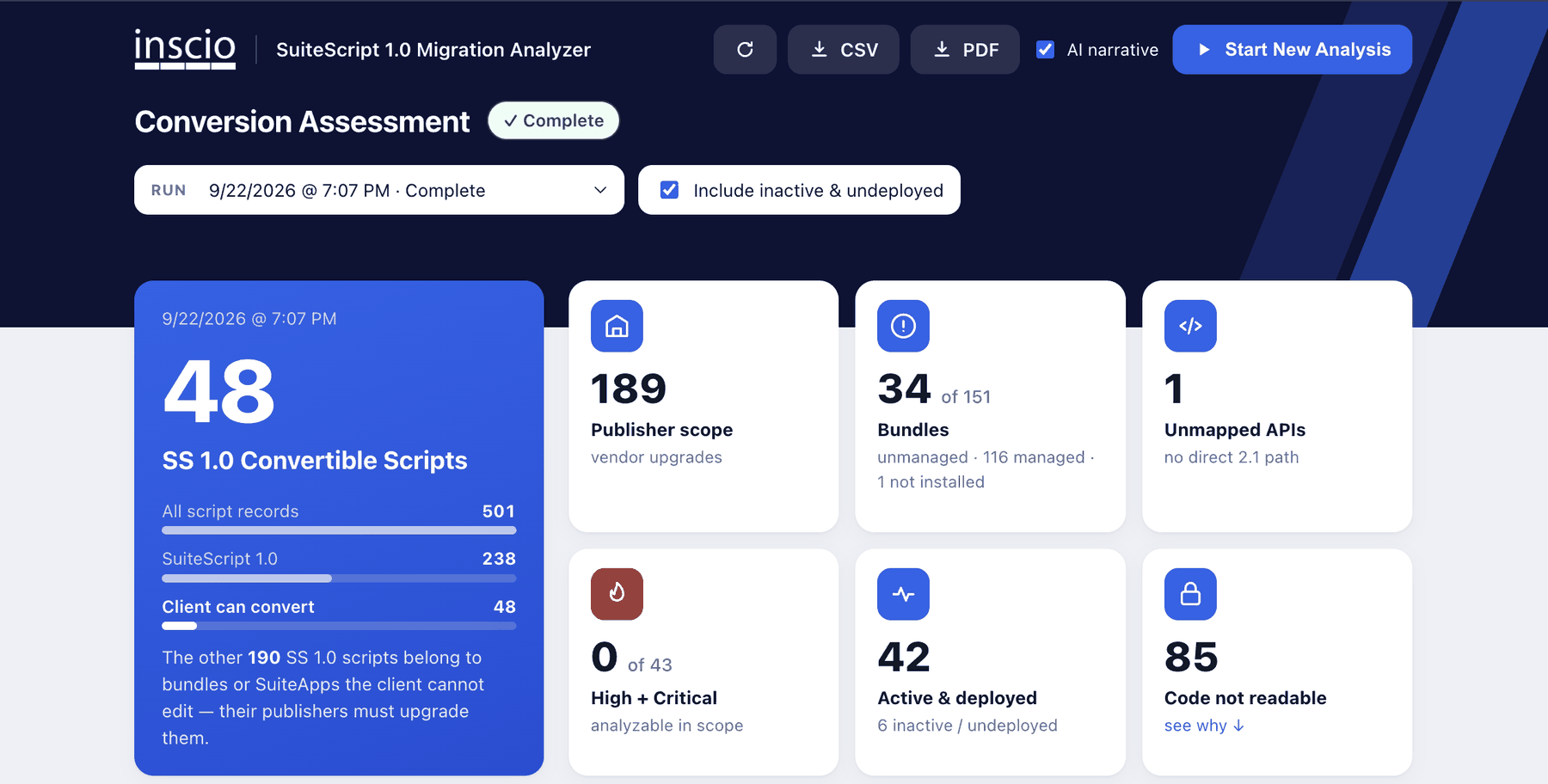
The number that matters
Not how many 1.0 scripts you have. How many you can actually do something about.
Export everything
CSV for your own analysis, PDF for the people who need a document. Both are yours permanently.
We clean up after ourselves
Our code comes back out when the engagement ends. You should expect that from anyone who deploys into your production account.
How this works
Five steps, and only one to-do for you.
You grant access, and we handle the rest. The access step is the one that takes real time on your side, so start it the same day.
02
Grant access
Your administrator gives us access to deploy our analyzer. We send the exact permissions after checkout.
Your admin, same week
03
We analyze
Our analyzer runs inside your account and reads your script records directly. No workshops, no discovery calls, nothing for your team to fill out.
Us, not you
04
Plan delivered
The document lands, with your script inventory, your scope, and your conversion quote already calculated.
Us, not you
05
Review call
A 30-minute call to walk the findings together and answer what a document cannot. We send a booking link once your plan is delivered.
After delivery
If you convert with us
Four phases, with something in your hands at every one.
The plan tells you what has to happen. This is how we do it.
Setup and analyze
Sandbox confirmed, scripts imported and version-controlled, baseline tagged. Nothing is touched before there is a copy to return to.
Convert
Each script rebuilt in 2.1 and peer reviewed. Same behavior, modern framework, with a plain-language record of every change we made.
Test
A test document per script, written around what that script does for your business rather than what the code does. Your team signs off before anything goes live.
Deliver
The 2.1 versions go live and the legacy 1.0 records are retired cleanly. You keep the full documentation.
Your quote is already in the plan
Conversion is priced per script, in complexity bands, with the criteria printed in your plan so you can check our math. Because the plan counts your scripts and bands them, the price comes out of the document itself. Nothing to wait for and no proposal cycle.
If you want us to do the work, the review call is where you say so. We start from a short engagement letter against the scope already in your plan.
What the plan does not cover
- Vendor and bundle-owned scripts. We will identify them, but a SuiteApp publisher has to update their own code. We cannot convert it for them.
- Integration authentication changes. NetSuite is retiring older integration authentication on a separate schedule from SuiteScript. Related work, different deadline, and we will say so rather than bundle them.
- Anything outside your NetSuite account. Middleware, external systems, and third-party platforms that call into NetSuite are their own scope.
Two known exceptions worth flagging early: SuiteTax currently requires SuiteScript 2.0 for full functionality, and Scriptable Cart does not support 2.1 client scripts. If either applies to you, the plan says so.
Who this is for
Three situations this solves.
You have no idea what is in there
Years of customization by people who have moved on. Nobody currently at the company can tell you what the scripts do or whether they still run.
Your implementer is gone
The firm that built your account is out of business, acquired, or unreachable. You have no documentation and nobody to call.
You need a number for a budget
You know the deadline is coming and you have been asked what it costs. You need something defensible, not a guess.
Questions
Before you buy.
What access do you need, and do you install anything?
We deploy our analyzer into your account as a Suitelet. It reads script records, deployments, bundles, and execution logs. It does not read transactions, customers, employees, or financial data, and it changes none of your existing scripts, records, or configuration. It stays for the engagement so you can look at the assessment, and we remove it thirty days after your plan is delivered. Your exports are yours to keep.
What if I have no SuiteScript 1.0 at all?
You still have a 2028.2 deadline. Scripts on 2.0 and on the 2.x annotation have to move to 2.1 as well. That work is much lighter, and the plan tells you how light.
Will my scripts stop working before 2028.2?
No. SuiteScript 1.0 keeps running until then. What changes sooner is support: from 2027.1, NetSuite addresses critical issues only on 1.0.
Can my own developer do the conversion?
Yes, and so can another firm. The plan is written so they can pick it up: what each script does, what has to change, and in what order.
What does the conversion itself cost?
It is priced per script, in complexity bands, with the criteria printed in your plan so you can check the math. Your plan includes the count and the scope, which is what the price is built from.
NetSuite is all we do. Your conversion is handled by people who have worked inside these accounts since 2012.
Get started
Know where you stand.
Checkout takes about two minutes. We send the access instructions immediately afterward.
SuiteScript Conversion Plan, built from your account.
- ✓ Full script inventory and conversion scope
- ✓ Your conversion quote, already calculated
- ✓ A 30-minute review call with the consultant who ran it
- ✓ Yours to execute with anyone
By purchasing you accept the Conversion Plan Terms of Service.
Start the access request today
This is the only step that takes real time on your side, and it runs in parallel with everything else. Your administrator will need to:
- Create a read-level role with permission to view scripts, script deployments, and bundles
- Assign it to the user we name after checkout
- Confirm whether we should look at production, a sandbox, or both
We send the exact permission list the moment you pay, so you can forward it straight to your admin.
Not sure this is you?
If your account is unusually large, heavily integrated, or you are not sure the standard analysis fits, talk to us first. We would rather tell you the plan is wrong for your situation than sell you one.
Book a call instead2028.2 is a fixed date. What is in your account is not a mystery.
Find out for $500, and take the answer wherever you want.
Get your conversion plan